
Quick answer: WordPress security headers are instructions sent by your web server or content delivery network (CDN) that tell browsers how to handle scripts, frames, HTTPS connections, content types, and certain browser features. The most useful controls to evaluate are Content-Security-Policy (CSP), Strict-Transport-Security (HSTS), X-Content-Type-Options, Referrer-Policy, and clickjacking protections such as CSP frame-ancestors. They can reduce the impact of particular attacks, but they cannot repair a vulnerable plugin, remove malware, or replace updates and access controls. Start by inspecting your actual responses, then introduce changes carefully, especially CSP and HSTS.
A WordPress owner may see a security scanner display a poor header grade and assume that installing one plugin will fix everything. The opposite mistake is to dismiss headers as cosmetic because the website already has HTTPS. Neither view is accurate. Browser-enforced policies can make exploitation harder, but a careless configuration can break checkout, embedded forms, analytics, page-builder assets, or legitimate integrations.
This guide explains what the major headers do, which ones need special planning, how to check the headers that visitors actually receive, and how to implement and troubleshoot them without treating a generic checklist as a universal production configuration. The diagrams are original educational illustrations, not screenshots of a particular site’s security configuration.
- Inventory your WordPress site, CDN, server and critical third-party integrations.
- Confirm HTTPS works, then review transport security before considering HSTS.
- Check
X-Content-Type-Options: nosniffand an appropriateReferrer-Policy. - Plan clickjacking protection and test any legitimate framing needs.
- Develop CSP in
Content-Security-Policy-Report-Onlymode before enforcing it. - Test the final response across normal pages, forms, checkout, admin and cached delivery.
What are HTTP security headers, and why do they matter to WordPress?
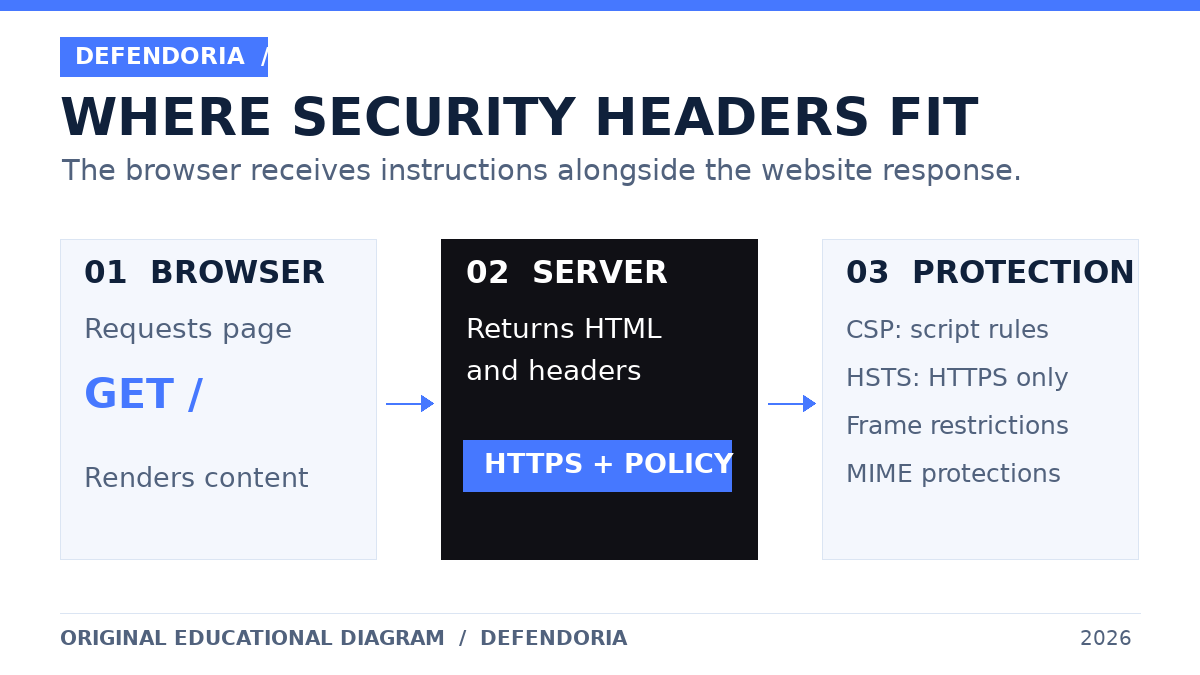
When someone opens a WordPress page, the browser sends an HTTP request. The server replies with a status, headers and, usually, an HTML document. Security-related response headers provide instructions that the browser can enforce before or while rendering that document. They are not visible as a paragraph on the page, which is why a site can look completely normal while its policy configuration is weak or overly restrictive.
For example, a CSP can limit which scripts are allowed to run; a frame policy can restrict which websites may embed your page; HSTS can tell browsers to use HTTPS for future connections; and a MIME-type protection header can stop browsers from guessing certain resource types. These defenses apply in the browser. They do not guarantee that the WordPress installation, hosting account, database, or server is uncompromised.
WordPress sites are especially likely to have a changing mix of assets: a theme may enqueue JavaScript, a form plugin may load validation code, an ecommerce checkout may call a payment service, and a marketing tool may embed third-party resources. A policy that works on a simple blog page may still fail on a product page or inside the dashboard. That is why a header rollout must be based on actual dependencies rather than copying a random example.
The security headers that deserve attention
1. Content-Security-Policy (CSP): control what the browser may load and execute
CSP is a flexible browser policy for controlling resources and certain document behaviors. Directives such as script-src, style-src, img-src, connect-src, frame-src, form-action, base-uri, and frame-ancestors address different behaviors. A restrictive, correctly deployed CSP can reduce the impact of some cross-site scripting (XSS) attacks, especially when it uses per-response nonces or approved hashes for scripts. But CSP is a defense-in-depth control, not a substitute for escaping output, sanitizing input, updating software or fixing an underlying injection flaw.
A basic conceptual example is Content-Security-Policy: object-src 'none'; base-uri 'self'; frame-ancestors 'self'. It restricts legacy object embeds, limits base URL behavior and restricts which origins may frame the page. It is not a complete script policy and should not be mistaken for a ready-made, strict CSP. The right directives depend on whether the site needs embedded forms, a payment iframe, an external video, cross-origin API calls or page-builder scripts.
A stronger script policy may rely on a cryptographically random nonce generated for each HTTP response or on hashes of known scripts. Simply pasting a fixed nonce into a settings box defeats the point of a nonce. Also, caching introduces complexity: a cached page and its CSP header must agree on the nonce used by the script tags. A strict policy copied without adapting the rendering and cache layers can block legitimate WordPress functionality.
WordPress-specific trade-off: themes and plugins may output inline scripts, styles or event handlers. A CSP that forbids them can expose compatibility issues. Avoid treating 'unsafe-inline' or a broad wildcard as a permanent shortcut; they may significantly weaken the protection you intended to add. In some cases, the correct answer is to change how assets are loaded, use hashes/nonces, replace an incompatible integration, or accept a documented residual risk while you plan a safer migration.
2. Strict-Transport-Security (HSTS): require HTTPS for future connections
HSTS tells a supporting browser to access a host over HTTPS for a specified period. The header is sent over a secure HTTPS response. A simple example is Strict-Transport-Security: max-age=300, which asks the browser to remember the rule for five minutes. This short value is an illustrative staged test, not a blanket recommendation for a mature production site.
Longer policies such as max-age=31536000 keep the rule for a year. includeSubDomains extends coverage to subdomains, and preload signals an intent to join browser preload lists when the domain meets their criteria. These options have operational consequences. If a subdomain still serves HTTP-only content, if a certificate expires, or if an old vendor endpoint cannot use HTTPS, a long-lived policy can make that destination inaccessible to affected browsers. Preloading is especially consequential because removal is not immediate.
Do not add includeSubDomains just because a scanner recommends it. First inventory mail-related web portals, staging hosts, customer portals, legacy microsites and any other subdomain. Check whether your host or CDN already sends HSTS and whether another layer overwrites it. Plan certificate monitoring and a rollback procedure, then increase the duration after successful testing. HSTS is not a certificate and does not encrypt data by itself; HTTPS and valid TLS configuration remain prerequisites.
3. X-Content-Type-Options: stop certain MIME sniffing
X-Content-Type-Options: nosniff instructs browsers not to reinterpret certain resources as a different MIME type. It is useful when a server accidentally labels a JavaScript or stylesheet resource incorrectly, and it complements correct Content-Type values. It does not make arbitrary uploads safe or eliminate the need to validate uploaded files, restrict execution in upload directories, and keep file handling secure.
A site owner should verify that JavaScript and CSS assets are served with correct content types before enabling changes across a CDN. If a script fails after the header is added, inspect the response Content-Type and the browser console. The solution is normally to correct the server’s MIME mapping or asset delivery, not to remove the protection permanently.
4. Referrer-Policy: limit information shared during navigation
The Referrer-Policy header controls how much information about the page a visitor came from is included in a subsequent request’s Referer header. A common starting point is strict-origin-when-cross-origin, which generally sends the full URL for same-origin requests but only the origin for secure cross-origin requests, and does not send referrer information when moving from HTTPS to HTTP. This is also the modern default in major browsers, but explicitly setting it can make the intended policy clearer.
A stricter no-referrer policy sends no referrer information. That may be appropriate for sensitive workflows, but it can affect attribution and legitimate analytics. Choose based on the data in your URLs and your business needs. Most importantly, do not put secrets, passwords, access tokens or personal data in URLs and assume a referrer policy alone will protect them.
5. Clickjacking protection: frame-ancestors and X-Frame-Options
Clickjacking can occur when an attacker embeds a legitimate interactive page inside a deceptive frame and tricks a visitor into clicking it. CSP’s frame-ancestors directive controls which origins may embed the protected page. For example, frame-ancestors 'none' prohibits embedding, while 'self' allows the same origin. The older X-Frame-Options: DENY or SAMEORIGIN header can provide an additional compatibility layer, although frame-ancestors is the modern preferred control in supporting browsers.
Be careful with legitimate embedding. A client portal displayed inside a trusted application, a WordPress preview flow or a partner integration may require a specific embedding origin. frame-src is a different directive: it governs what your page may embed, not who may embed your page. Confusing the two is a frequent source of incorrect configurations. Also note that frame-ancestors must be delivered as an HTTP header; putting it in a CSP meta tag does not provide the same protection.
6. Permissions-Policy and cross-origin headers: useful, but context-dependent
Permissions-Policy can restrict selected browser features such as camera, microphone or geolocation. A site with no reason to request camera access might use camera=(); a telehealth portal that genuinely uses the camera would need a different decision. This policy is not a generic malware blocker, and supported features can vary by browser. Check the specific feature names and the functionality of your site before adding directives.
Headers such as Cross-Origin-Opener-Policy, Cross-Origin-Embedder-Policy and Cross-Origin-Resource-Policy are more specialized. They can support isolation goals but may disrupt popup login flows, payment windows, cross-origin assets and embedded services. Do not enable strict cross-origin isolation solely to improve a scanner grade. First determine whether your application needs it and test all integrations.
Which old or misleading headers should you avoid copying?
Some older security checklists recommend X-XSS-Protection: 1; mode=block, Public-Key-Pins, or Expect-CT. These are not sensible default additions to a modern WordPress security plan. OWASP advises leaving the legacy XSS filter header unset or explicitly disabling it with X-XSS-Protection: 0, because historical browser implementations can have undesirable behavior. HTTP Public Key Pinning is obsolete and unsafe to reintroduce. The current value of a header should be judged by browser behavior and operational risk, not by the number of green checks on a grading website.
A second misconception is that more headers always mean more security. A Content-Security-Policy allowing every script origin, or an HSTS policy that locks out a critical subdomain, can create the appearance of maturity without delivering the intended outcome. The goal is a documented, tested policy that protects the real website.
Discuss your hosting stack, critical integrations and observed issues as part of an authorized website review. Please do not share passwords or private keys in the inquiry form.
How to check the security headers your WordPress site actually sends
Start with a representative page opened in a private browser window. In browser developer tools, open the Network tab, reload the page, select the main document request and inspect Response Headers. Do not confuse the request headers the browser sends with the response headers returned by the site. Look for the exact policy values, not just the header names.
Repeat this check on the homepage, a blog post, a contact form, login page and, where relevant, the WooCommerce cart and checkout. If the website uses a CDN, test both cached and uncached responses when you have a safe method to do so. Also inspect a CSS or JavaScript resource if you are troubleshooting a MIME issue. Headers may differ by path, content type, cache state, or whether the visitor is logged in.
For administrators comfortable with the command line, a read-only check such as curl -I https://example.com/ can display response headers for a HEAD request. Replace the example address with your own domain. Some services treat HEAD differently from GET, so confirm the result in browser developer tools or with an appropriate GET request when a discrepancy matters. A public scanner can help with an initial inventory, but do not submit authenticated URLs, private staging links or sensitive endpoints to a service without checking its privacy terms.

How to implement headers safely in WordPress
There is no single correct place to set every header. On a managed host, a CDN or reverse proxy may control the final response. On Apache or Nginx, a server configuration may be the authoritative layer. In WordPress itself, the official wp_headers filter and send_headers action can influence responses generated through the WordPress request lifecycle. But those PHP hooks may not run for static files, CDN-served cache hits or pages served before WordPress loads.
First, identify who owns the response. Ask the hosting provider whether security headers are already applied globally and which settings are safe to edit. Avoid adding the same header independently in the CDN, server, plugin and theme: duplicate or conflicting policies can be hard to diagnose. For CSP in particular, multiple enforced policies can combine restrictively rather than allowing the broader of two configurations.
Second, make a change plan. Record existing headers and relevant integrations, create a current backup, define which routes are in scope and decide how to roll back. Use a staging environment that mirrors production dependencies as closely as practical. Some third-party checkout integrations behave differently in sandbox mode, so a staging pass does not eliminate the need for careful production observation.
Third, deploy low-risk controls after validation. Correct content types, assess nosniff, choose a referrer policy and decide whether framing restrictions match your site. Validate with browser tools and functional tests. These controls are often simpler than CSP, but even they deserve verification.
Fourth, introduce CSP in Report-Only mode. Send a proposed policy using Content-Security-Policy-Report-Only and collect violation reports through a secure, authorized endpoint or a trusted reporting service. Report-only mode lets you observe many violations without enforcing the proposed policy. Review the reports rather than automatically whitelisting every domain you see; browser extensions, injected third-party scripts, malicious activity and noisy integrations can all appear in telemetry. Where possible, remove unnecessary resources before broadening a policy.
Fifth, enforce only a tested policy. Test on mobile and desktop, in different browsers and with logged-in and logged-out sessions. Validate form submissions, search, menus, media players, checkout, payment redirects, captcha, consent managers, accessibility widgets and admin editing. Document exceptions. A policy that works on a marketing homepage but blocks a payment flow is not ready.
Finally, monitor after release. Theme and plugin updates may change scripts or domains. A new marketing integration may add a third-party endpoint. Keep ownership clear: someone must review CSP reports, approve policy changes and test critical flows after releases. This is part of ongoing maintenance, not a one-time plugin checkbox.
Example: a WordPress contact form stops submitting after CSP is enforced
Imagine a business website whose contact form opens correctly, but clicking Send appears to do nothing after a header change. That symptom does not prove an attack. Open the browser console and network panel while reproducing the problem. A message saying that a script, connect-src endpoint or inline event handler was blocked by CSP points toward a policy mismatch. A server-side 500 error or invalid form nonce points somewhere else.
Identify which component makes the request and whether the endpoint is expected. If the form submits to the site’s own REST API, a missing 'self' allowance in connect-src may be relevant. If a trusted third-party service processes the form, its documented domain may need a narrowly scoped allowance. But do not add https: or * indiscriminately just to silence the console. Reproduce the issue on staging, make the smallest safe change, then test submission and delivery end to end. Confirm that a success message corresponds to a real saved submission or email; a visually successful form is not sufficient evidence.
The same method applies to payment widgets and analytics. Investigate the exact blocked resource, confirm business necessity and review the provider’s official integration documentation. If the provider requires a broad exception, record the trade-off and consider whether a more compatible integration exists.
Example: HSTS breaks a legacy subdomain
Consider a company that has www.example.com on modern HTTPS hosting but still runs archive.example.com on a legacy system without a valid certificate. Applying includeSubDomains with a long HSTS lifetime to the parent domain can make the archive inaccessible in browsers that have learned the policy. A normal redirect or browser warning override may no longer help those visitors.
The correct sequence is to inventory the subdomains, migrate or retire the legacy service, verify certificates and redirects, and only then consider a broad HSTS scope. If the organization cannot control all subdomains, it should not pretend that a universal includeSubDomains policy is safe. For a staging hostname on a shared parent domain, check the host’s rules before experimenting with HSTS at all.

Troubleshooting checklist when a security header causes problems
- Identify the failing path and user state. Is the problem limited to checkout, login, logged-in editors, one browser, or cached pages?
- Capture the exact response. Save the URL, timestamp, status code, response headers and relevant console error. Avoid copying customer data into tickets.
- Determine the controlling layer. A CDN rule may override a WordPress plugin. A server configuration may apply headers to static assets that never touch PHP.
- Compare the policy with actual dependencies. Map script, style, image, frame and connection sources separately. Do not assume one directive controls everything.
- Make one narrow change at a time. Use a staging copy and a rollback plan. Re-test all critical functions after every change.
- Check caching and variation. A CSP nonce must match the page that was served. Mixed cache keys or stale HTML can cause inconsistent failures.
- Review access and security logs. A newly observed error may coincide with, but not be caused by, a header change. Investigate independently if signs of compromise appear.
- Document the final policy. Keep a record of who approved it, why exceptions exist and when it should be reviewed again.
How much protection do security headers really provide?
They provide targeted browser-level defenses. A well-implemented CSP can make certain injection attacks harder to exploit; clickjacking controls can prevent unauthorized framing; HSTS can reduce future downgrade exposure after a browser learns the rule; and nosniff can limit particular content-type confusion risks. Those are meaningful outcomes, but none of them authenticates WordPress administrators, patches a vulnerable extension, checks backup integrity or removes an attacker from the hosting account.
A practical security program also needs maintained WordPress core, plugins and themes; multifactor authentication for privileged users; least-privilege accounts; secure hosting and file ownership; backups with tested restoration; malware detection; and an incident response plan. If you are unsure which controls are missing, a scoped WordPress security review or website security audit can help prioritize real risk instead of chasing a perfect scanner score.
Frequently asked questions
Are security headers required for every WordPress website?
There is no universal single header set that fits every site. Most public WordPress sites can benefit from evaluating common protections, but the correct values depend on hosting, subdomains, integrations and application behavior. Some organizations may also have contractual or regulatory requirements that need a separate review.
Does a security headers plugin make WordPress secure?
No. A plugin may help configure response headers, but it does not automatically fix insecure code, weak credentials, compromised accounts or malware. Also, a plugin cannot reliably control every response when a CDN or web server serves content without running WordPress PHP. Verify the headers visitors actually receive.
Can CSP break WordPress or WooCommerce checkout?
Yes. A restrictive CSP may block inline scripts, payment widgets, API requests, captcha or third-party assets needed by a checkout. Use Report-Only testing, inventory payment providers, test the entire transaction journey in an authorized environment and roll out carefully. Never assume a green homepage test proves checkout compatibility.
Should I enable HSTS preload immediately?
Usually not without preparation. Preload is a long-term commitment requiring the domain and relevant subdomains to meet HTTPS criteria. Review all subdomains, certificates, redirects and operational ownership first. A staged HSTS deployment is safer than copying a preload recommendation from a scanner.
Is X-Frame-Options still useful if I use CSP?
CSP frame-ancestors is the preferred modern way to control who may embed a page. X-Frame-Options can be retained as an additional compatibility measure where its DENY or SAMEORIGIN setting agrees with the intended framing policy. It does not replace a full CSP and should not conflict with legitimate embedding needs.
Does HTTPS already provide the same protection as security headers?
No. HTTPS protects data in transit between the browser and the endpoint when properly configured. CSP, framing rules and MIME protections govern different browser behaviors. HSTS complements HTTPS by instructing browsers to prefer secure connections in future requests; it is not a replacement for TLS.
Why do my headers differ between a scanner and browser developer tools?
The tools may request different URLs, use different methods, hit different cache layers, or test different user states. A CDN can alter headers and a HEAD request may behave differently from a normal GET. Compare the exact request and response before deciding which result is authoritative.
Will adding security headers improve Google rankings or guarantee AI citations?
No ranking or citation outcome is guaranteed. Security headers can contribute to a safer website, but search visibility depends on many other factors, including content quality, technical accessibility and indexing settings. On a staging site configured to discourage indexing, publishing a strong article does not override the site’s noindex policy.
Sources and further reading
The recommendations above are based on browser and WordPress documentation, with configuration decisions deliberately presented as context-dependent rather than universal. The examples are educational, not a live assessment of any specific website.
- OWASP HTTP Headers Cheat Sheet — browser security header purpose, recommended controls and deprecated headers.
- OWASP Content Security Policy Cheat Sheet — CSP defense-in-depth and deployment choices.
- Google web.dev: Mitigate XSS with a strict CSP — nonce/hash approaches and Report-Only rollout.
- MDN: Content Security Policy — directives, enforcement and browser behavior.
- MDN: Strict-Transport-Security — lifetime, subdomains and HTTPS consequences.
- WordPress Developer: send_headers action — WordPress response header hook.
- WordPress Developer: wp_headers filter — response headers in the WordPress request lifecycle.
Related Defendoria guides:WordPress file permissions, plugin vulnerability checks, when to update WordPress immediately, and malware cleanup.
This is general educational guidance, not a security assessment of a specific website. Obtain authorization before any technical testing.