Quick answer: Nulled WordPress plugins and themes are commonly altered copies of paid software distributed to bypass licensing or make premium features appear unlocked. Their biggest security risk is not the WordPress GPL license itself, but an untrusted build and update chain: a third party may add hidden code, disable safeguards, steal data, or leave backdoors. Not every redistributed GPL package contains malware, and not every nulled copy has been proven infected. The safest business decision is to use trusted sources, understand license and support terms, and investigate any suspicious copy before replacing it carefully.
The offer can be tempting. A website owner needs a premium page builder, form integration or ecommerce tool, and a third-party website advertises it for free or a fraction of the original vendor’s price. The zip file may carry the same name, logo and apparent version as the legitimate product. It may even perform the advertised feature. None of those visible details proves the underlying code has not been modified or that vendor updates and cloud services will work.
WordPress’s official hardening guidance advises choosing trusted plugin and theme sources, particularly the WordPress.org repository and well-known developers. Wordfence has documented real tampered plugin campaigns and investigated how counterfeit security tools can create a misleading appearance of protection. This guide separates the licensing question from the technical risk, explains what malicious modifications can do, and provides a responsible response for a site that already has an unverified package installed.
- Identify the exact product, developer and distribution source.
- Check whether the package is a legitimate maintained fork, authorized vendor release, or modified “premium unlocked” build.
- Inspect update and support claims, including any cloud services that require an active subscription.
- Do not trust a dashboard message saying “premium activated” as proof of authenticity.
- If compromise is suspected, preserve evidence and use a controlled replacement and security review.
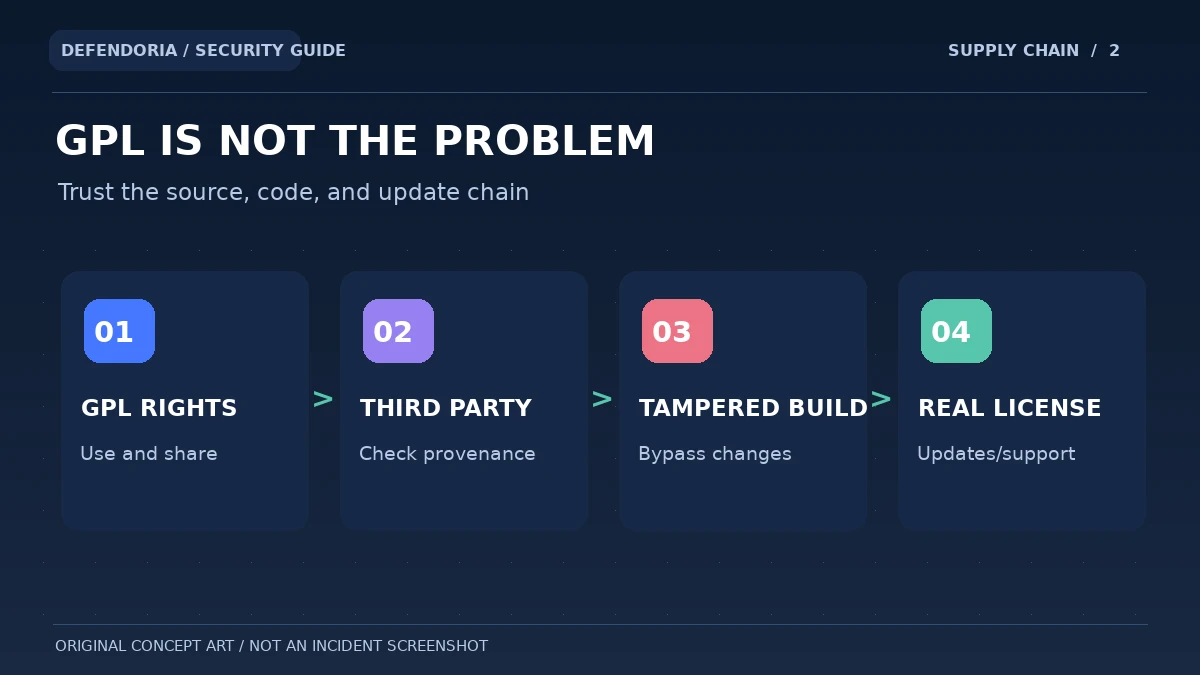
GPL rights and the safety of a specific modified software package are separate questions.
What is a nulled WordPress plugin or theme?
In common WordPress security discussions, “nulled” means a paid extension or theme whose code has been modified to bypass a license check, unlock restricted functionality or impersonate a premium release. A third party may distribute the changed archive through a download portal, file-sharing group, online marketplace or an unverified contractor. Some such packages contain harmful code, while others primarily mislead users about updates or paid services.
A modified archive does not necessarily behave like the genuine product. Features that depend on a vendor’s cloud servers, licensed API access or frequently updated threat intelligence may fail, be outdated or show a false status. For security plugins in particular, a counterfeit “premium” badge cannot create real access to vendor-managed firewall rules and updates. This creates a dangerous sense of confidence if owners stop checking actual protection.
Are GPL-licensed redistributed WordPress plugins legal?
WordPress is distributed under GPLv2 or later, a free-software license that allows use, study, modification and redistribution under its terms. The WordPress project takes the view that derivatives such as plugins and themes generally inherit GPL responsibilities, while acknowledging some licensing complexity. So it is misleading to say that every third-party redistribution of GPL software is automatically piracy or malware.
However, software can combine open-source code with trademarks, service subscriptions, proprietary external assets or support arrangements that have their own conditions. A distributor may also misrepresent itself as the original vendor. The legal status of a specific package depends on the materials, license terms and jurisdiction; this article is not legal advice. From a security perspective, the critical questions are provenance, code integrity, maintenance and the trustworthiness of the party who supplies updates.
A responsibly maintained fork that transparently identifies its developer, source repository, license and security process is a different proposition from a zip file advertising a paid license bypass with no credible origin. Neither should be installed blindly, but treating them as identical would conceal the real technical differences.
Why untrusted premium plugin packages can be dangerous
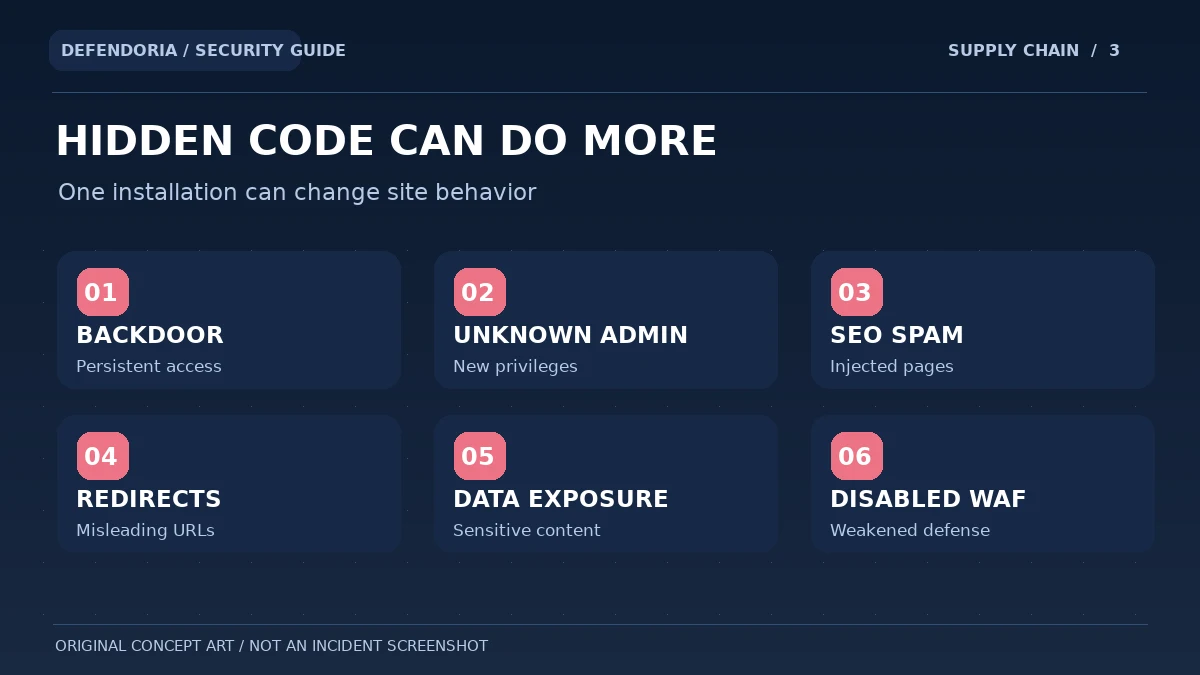
1. Hidden backdoors and persistence
A third party can add PHP or other code that waits for a particular request, executes when a page loads, or recreates unauthorized changes. Some backdoors are designed to remain hidden until a trigger arrives. An administrator might delete a visible spam page while the hidden component still holds the ability to reintroduce it.
2. Unexpected administrator accounts
Malicious code with appropriate privileges can attempt to create or modify users, including administrator accounts. An owner may later see a strange privileged user or unexplained role change. Review identities and their creation history with authorized access; do not assume every unfamiliar integration account is malicious without checking.
3. Search-spam content and malicious redirects
Attackers may monetize compromised websites through keyword-stuffed pages, unauthorized outbound links or redirects to scams. These symptoms can affect visitor trust and Google Search appearance. A product that seems to work correctly in the dashboard can still modify the content delivered to anonymous visitors.
4. Sensitive data exposure
A compromised extension handling forms, customer accounts or checkout may be in a position to access data it was not supposed to transmit. The precise exposure depends on code, permissions and integration design. Do not claim a data breach from an unverified package alone; investigate relevant evidence and involve appropriate responders if the website handles sensitive information.
5. Disabled or degraded security defenses
A tampered plugin can interfere with protective tools. Wordfence’s 2025 investigation described code that could rename a security plugin directory and disable defenses under specified conditions. That was a documented campaign, not proof that every nulled plugin disables a firewall.
6. Missing updates and unreliable support
A package outside the normal vendor channel may not receive security releases or timely compatibility patches. Its original developer may be unable to verify the customer or provide direct support. Even if the archive is not currently malicious, long-term update uncertainty increases operational risk.
Describe the source and the symptoms to discuss an authorized assessment. Do not send passwords, private license keys or unreviewed customer data.
What has real security research found?
Wordfence published an analysis in September 2025 of two suspicious premium-plugin packages supplied from a compromised site. The team found modified code that could weaken security defenses and create opportunities for persistent access. The significance is the technique: a recognizable premium interface does not prove the file came from the vendor, and hidden changes may only activate later. This was a particular investigated case, not a universal prevalence rate.
Wordfence’s earlier 2021 report also distinguishes counterfeit or tampered versions from genuine vendor distributions and expressly acknowledges that not every nulled plugin contains malware. Academic work presented by USENIX researchers studied malicious WordPress plugins across markets and documented harmful modifications in a sample of nulled packages. Such studies offer evidence that the risk is real, but their data should not be casually applied as a current infection probability for every download source.
The broader lesson is about supply-chain trust. Even a legitimate distribution channel can occasionally be compromised, so source reputation is necessary but not sufficient. Security-conscious owners also maintain version inventories, monitor unusual changes, preserve backups and respond to advisories. Still, choosing an unverified license-bypass build adds avoidable uncertainty on top of normal software-supply-chain risk.
How can you recognize a suspicious WordPress plugin distribution?
1. The seller promises a premium license without the developer’s verification
A third party may claim that every paid feature is unlocked permanently, although a real product may rely on external vendor services that cannot be enabled by editing local PHP files. Check whether the vendor recognizes the license and whether update channels are authentic.
2. There is no trustworthy maintainer identity or release history
A legitimate redistribution or fork should make its origin, package changes and maintenance responsibility understandable. Anonymous archives, missing version history and vague contact information increase uncertainty. A polished storefront or logo does not substitute for provenance.
3. The plugin requests unusual access or causes unexpected changes
New administrator accounts, unapproved remote connections, modified security settings or content changes deserve investigation. These symptoms do not automatically identify the downloaded package as the cause; compare timelines, changes and verified logs before assigning blame.
4. The download is promoted through urgent scare tactics
A page claiming “install this nulled security patch now or lose your website” may be attempting social engineering. Use the legitimate vendor’s communication channel to confirm that any update exists. Never run an unfamiliar installer or command solely because a popup creates urgency.
5. The code does not match a known trusted build
A qualified developer may compare files, release signatures or checksums when a trusted reference exists. A mismatch can be legitimate in a maintained fork, but unexplained additions deserve examination. Automated scanner findings should be corroborated, and unsupported “virus-free” marketing claims should not be taken as evidence.
What should you do if you already installed a nulled plugin?
Do not panic or assume the site is definitely infected. Equally, do not just delete one zip file and declare the installation safe. First establish which product was installed, who supplied it, when it was activated, which sites use it and what business functions depend on it. If there are active warning signs such as suspicious redirects, unknown administrators or altered checkout scripts, prioritize visitor protection and coordinate incident response with the authorized owner and hosting provider.
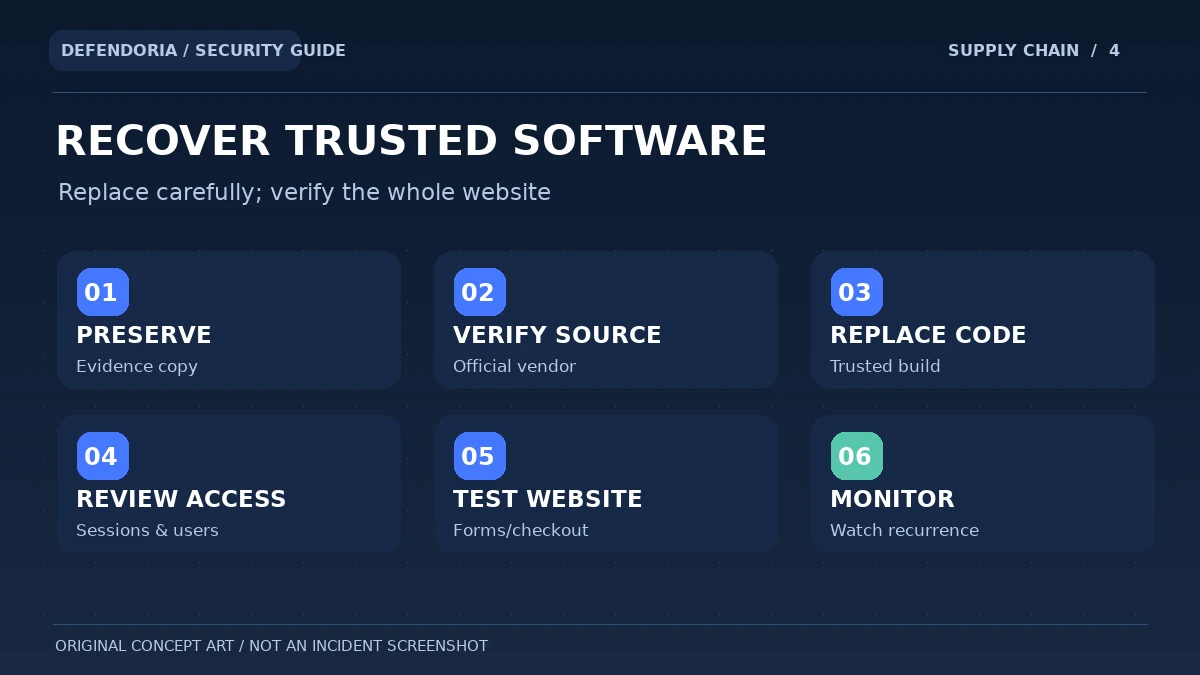
1. Preserve a secure snapshot and recent evidence
Before destructive changes, capture the package identity, plugin inventory, relevant file and database state, recent updates, logs and any security warnings where feasible. Label current snapshots as potentially compromised. Do not upload sensitive archives to public scanning websites without appropriate authorization.
2. Verify original developer and legitimate replacement
Find the official developer site or WordPress.org listing and confirm the maintained version and trusted update route. Where a transparent GPL fork is being used, evaluate its maintainer and code provenance separately rather than assuming every non-vendor build is malicious.
3. Plan a compatible migration
Check whether forms, shortcodes, memberships, checkout processes or page layouts depend on the package. A direct deletion can break those functions. Use staging and a rollback plan where possible, and retain important legitimate customer data.
4. Replace affected code and examine suspicious changes
Remove or replace confirmed untrusted components through a controlled authorized process. If malware is suspected, look beyond the visible plugin folder for changed users, content, scheduled processes, external scripts and hosting settings. A basic replacement is not a full forensic assessment.
5. Secure accounts and important integrations
Review WordPress administrators, hosting access, recovery email, application passwords and other privileged identities when relevant. Rotate exposed credentials and revoke suspicious sessions through trusted channels. Avoid sending passwords or cloud access tokens to an unknown “cleanup” vendor.
6. Test the website and monitor for recurrence
Verify the site renders properly, important forms and checkout work, and the original suspicious behavior no longer appears under appropriate conditions. Review Search Console security information and hosting logs as needed. Document remaining uncertainty and follow-up owners.
Safer alternatives to unverified premium plugin downloads
Start with the official free edition if the vendor offers one, and review WordPress.org for maintained alternatives. Many businesses need only a subset of premium features. When a paid feature is genuinely required, obtain it through the vendor or an authorized partner and verify the subscription’s support and update terms. A known, maintained GPL fork can also be considered when its provenance and licensing are clear, though it must be evaluated for technical integrity and maintenance just like any other third-party software.
For agencies, maintain a software procurement inventory showing where each theme and plugin came from, what license or service agreement applies, who receives security notices, and how updates are deployed. This reduces the chance that a contractor quietly installs an unverified archive to save a small amount of money. A lower initial purchase price can become expensive if it results in downtime, lost orders or a prolonged incident investigation.
Frequently asked questions about nulled WordPress plugins and themes
Are all nulled WordPress plugins infected with malware?
No. Wordfence itself has stated that not every nulled plugin contains malware. The security problem is an untrusted, often modified distribution chain and the possibility of hidden changes, missing updates or misleading feature claims. Treat an unfamiliar package as a risk to assess, not proof of a breach.
Is GPL redistribution the same as using a nulled plugin?
No. GPL licensing provides rights to use, modify and redistribute covered code under its conditions. A maintained, transparent fork is not inherently a malicious license bypass. Nulled packages commonly refer to modified paid builds that claim to unlock restricted functionality. Source integrity and support are separate from the legal licensing question.
Can a nulled plugin create a WordPress administrator account?
Malicious code running with sufficient privileges may create or modify accounts. Security researchers have documented this and other types of persistence in tampered WordPress packages. A suspicious user still needs evidence-based investigation rather than assuming a particular archive caused it.
Do nulled plugins receive normal vendor security updates?
They may not. An altered package can be disconnected from the official update service, and premium cloud functionality may require a valid account or subscription. Check the actual release source and update path; a premium badge in the dashboard is not proof that vendor support works.
Is a discounted GPL plugin from a third party automatically illegal?
Not automatically. Rights depend on the specific code, license conditions, trademarks, bundled assets and commercial services. WordPress’s GPL terms allow many forms of redistribution. Legal questions about a particular product require reviewing its terms rather than broad claims about all third-party copies.
Will deleting the nulled plugin remove every backdoor?
Not necessarily. If malicious code already created another administrator, database injection, scheduled process or server-level persistence, removing the original plugin folder may leave the problem active. Follow a scoped investigation and recovery process when compromise is suspected.
Can an antivirus scan prove a downloaded plugin is safe?
No scanner can guarantee that an unfamiliar package has no harmful behavior. Scanners may miss novel or dormant code, while some legitimate patterns trigger false alerts. Prefer reputable provenance, version comparisons, secure testing and ongoing monitoring.
Can a tampered theme cause SEO spam or Google warnings?
It can, if injected code creates spam pages, redirects or unsafe content. Google warnings depend on what is detected, not simply on whether an unofficial theme is installed. If suspicious indexed pages appear, investigate Search Console and site behavior along with theme files and access.
What if a developer installed a nulled plugin without telling me?
Ask for the exact package, source, deployment date and business dependencies. Preserve relevant evidence, confirm ownership and authorization, and plan safe migration to a trusted alternative. Do not delete unrelated components blindly or share credentials before establishing a secure review process.
How can I avoid counterfeit WordPress security plugins?
Install through WordPress.org or the verified developer’s channel, confirm authorship, maintain legitimate update access and beware of unverifiable premium unlock offers. Protect accounts and review unexpected file changes. Even reputable sources are not immune to supply-chain risk, so continue updating and monitoring.
Primary sources and editorial notes
This article distinguishes legal GPL redistribution from the separate technical risks of tampered premium builds. It draws on WordPress’s licensing and hardening documentation, original Wordfence incident research and academic research on malicious WordPress plugins. The examples do not establish that any specific Defendoria customer site is infected; the illustrations are original educational diagrams.
- WordPress.org: GNU GPL License.
- WordPress Developer Handbook: Hardening WordPress.
- WordPress Plugin Handbook: Including a Software License.
- Wordfence: The Price of Free—Nulled Plugin Campaign (September 2025).
- Wordfence: Nulled WordPress Plugins—Dangers and Downsides.
- Wordfence: Use Genuine Wordfence and Avoid Backdoors.
- USENIX: Study of Malicious Plugins in WordPress Marketplaces.
This is general educational guidance, not a security assessment of a specific website. Obtain authorization before any technical testing.