
Quick answer: The Japanese keyword hack is a form of website compromise that generates unauthorized Japanese-language spam pages, often using random-looking URLs and links to counterfeit-shopping or affiliate destinations. Google has documented that attackers sometimes add themselves as Search Console owners. If your WordPress site shows unfamiliar Japanese results, document the affected URLs, check Security Issues and property ownership, preserve evidence, remove the underlying injection and access path, ensure obsolete spam URLs return appropriate responses, then request review when required. Japanese-language content alone is not proof of hacking.
A business may discover this problem by searching its domain and seeing dozens of Japanese titles for products it has never sold. The homepage may still display the expected English pages, and the WordPress Posts screen might show nothing unusual. That happens because injected spam can be served from modified files, database values, rewrite rules or other compromised components rather than normal published posts. Sometimes the malicious material is shown only to crawlers or to visitors from search results.
Google published a dedicated guide to this technique and described the Japanese keyword hack as autogenerated Japanese-text pages in randomly named directories. Its historical examples involved links monetized through counterfeit merchandise. That is an example of a documented attack pattern, not a claim that every Japanese page or affiliate link is malicious. The task for a site owner is to distinguish authorized multilingual content from injected pages and repair the whole mechanism that creates them.
- Record the suspicious Japanese search titles and actual URLs.
- Compare them with the site’s approved multilingual content and sitemap.
- Open the correct Search Console property and inspect Security Issues and verified owners.
- Preserve evidence, logs, files and database backups before destructive cleanup.
- Find and remove the source of the unauthorized pages, not only individual URLs.
- Verify responses for deleted pages and request Google’s review when appropriate.
A search query with site:example.com can provide clues, but Google does not guarantee that operator lists every indexed page.
What is the Japanese keyword hack in WordPress?
This is a search-spam attack in which unauthorized pages on a compromised site contain automatically generated Japanese text and commercial links. The content is designed to be discovered through search engines and may appear beneath an established business domain. Google has documented such pages appearing within random directory structures and sometimes being served differently to crawlers and ordinary visitors. The exact file paths and spam topics can change between incidents.
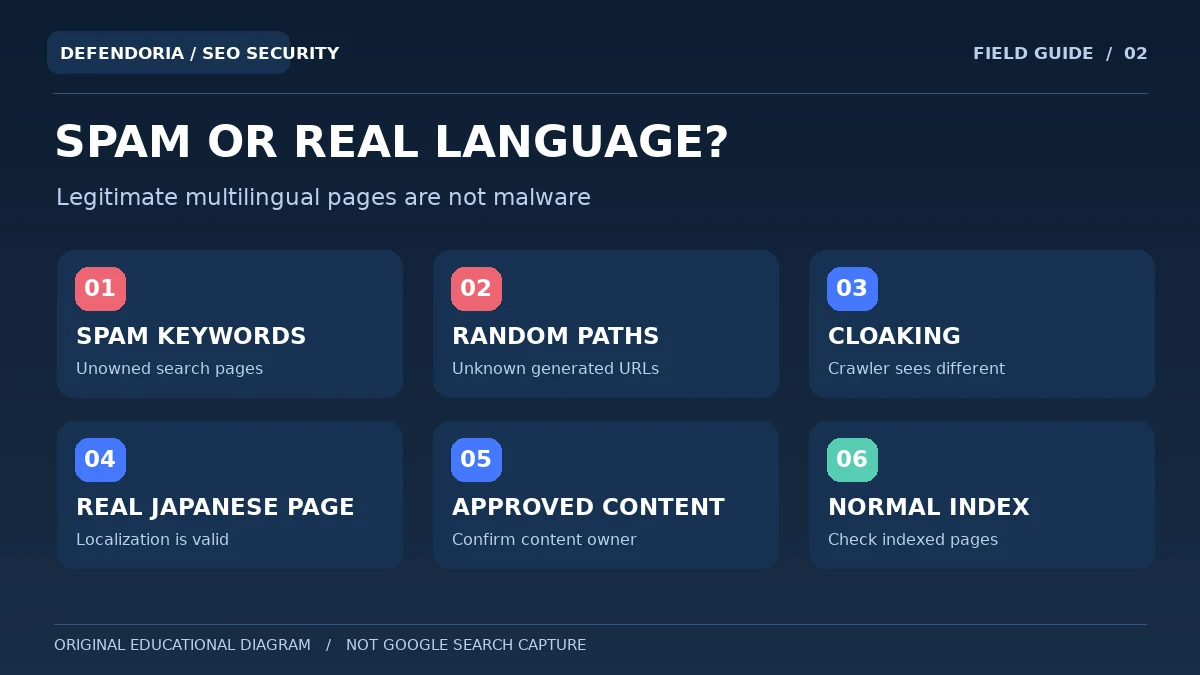
The issue is not that a website supports Japanese. An international company can publish legitimate Japanese pages with accurate translations, language navigation and an appropriate content strategy. The security concern is pages that no one authorized, unrelated product offers, suspicious URL patterns, and evidence of compromised access or content injection. Without those contextual checks, labelling every Japanese title as malware would be both technically unsound and unfair to legitimate multilingual publishers.
Six signs that search results may contain injected Japanese spam
1. Unfamiliar Japanese page titles under your domain
You search for your business and find products or shopping descriptions that your team never published. Compare the exact URL with WordPress’s content inventory and any approved translations or ecommerce catalogs. Google may retain older snippets after a page is fixed, so a current screenshot and live response help establish whether the content is still being served.
2. Random-looking paths or strange query strings
Some incidents generate pages in directories containing arbitrary letters or numbers, or unusual URL parameters. Google has documented random directory names in this attack type. However, random-looking identifiers also occur in legitimate applications, so focus on the page’s ownership and purpose, not merely the characters in the address.
3. Search-only content that disappears in your browser
The affected page may look like a normal 404 or homepage when visited directly, while a crawler or a referred visitor sees injected content. Such cloaking makes ordinary manual checks unreliable. Ask authorized technical responders to use Search Console diagnostics and relevant logs rather than unsafe or unauthorized traffic manipulation.
4. Unexpected links to unrelated merchandise
A compromised site can promote counterfeit goods, affiliate destinations or unrelated storefronts through its own URLs. A legitimate advertisement or approved affiliate partnership could also produce commercial links, so investigate who controls the content and whether the business intended it.
5. Unknown verified owners in Search Console
Google’s historical guidance warns that attackers have sometimes added themselves as property owners in Search Console. An unfamiliar owner deserves immediate verification with the legitimate organization, but not every unknown-looking service account is necessarily hostile. Review ownership methods and remove unapproved access and its verification token safely.
6. Security warnings or a changing index profile
Search Console Security Issues may show hacked content or sample affected URLs. An unusual surge in indexed pages or queries can be a clue, but indexing changes alone do not establish compromise. Check site history, migration records and whether the suspicious URLs genuinely exist.
Why does the WordPress dashboard look clean?
WordPress’s normal editing screens represent posts and pages stored through the application, but a compromise can affect other layers. A server rule, modified template, malicious plugin, database-generated route or hidden script may produce content that is not listed as a normal Post. Depending on the attack, a visitor’s device, user agent or referral source may change what they receive. Google documents cloaked keyword and link hacks as well as Japanese keyword injections.
Consider a company with 30 legitimate pages but thousands of unexpected URLs in search. Its content editor may see only the 30 approved pages. If a malicious component creates synthetic responses for unknown paths, checking the editor won’t reveal the mechanism. Conversely, an analytics or indexing report can contain old URLs from before a migration, so you must establish which pages actually return content now and whether that content is unauthorized.
Avoid copying suspicious links into personal browsing sessions or using real customer credentials to test them. Ask the hosting provider for request and error logs that may show which paths are requested and how the server responds. A qualified responder can compare the affected site against trusted code and configuration sources.
Discuss your affected URLs, Search Console findings and authorized response options without submitting passwords or sensitive credentials.
What causes a Japanese keyword hack?
1. Compromised plugins or themes
An attacker can exploit vulnerable or poorly maintained software to change files, database values or routing. The vulnerable extension may not itself display the Japanese content; a separate injected component might do that. Investigate actual versions and security evidence rather than blaming every old-looking plugin.
2. Stolen administrator or hosting access
Someone with sufficiently privileged credentials can add scripts, alter content or change configuration. Check authorized accounts across WordPress, email, hosting and deployment tools. A normal WordPress password reset may not remove access through a different service.
3. Injected scripts or server-side routes
Spam pages may be generated dynamically from code or rewrite rules, including paths never shown in the content editor. An unexpected JavaScript component may instead send visitors to external destinations. Verify the mechanism and preserve evidence before deleting unknown files.
4. Database persistence and scheduled tasks
An injection may be stored in application settings, generated content or plugin data, while a scheduled process can recreate removed pages. Scheduled tasks and generated records are also normal WordPress features; identify the owner and purpose before changing them.
5. Compromised related applications
Shared hosting, neglected staging installs or insecure external integrations can expand an incident beyond one WordPress dashboard. Host-level access and isolation become relevant when the injected content returns despite a seemingly clean application review.
How to check Search Console for unauthorized owners and spam URLs
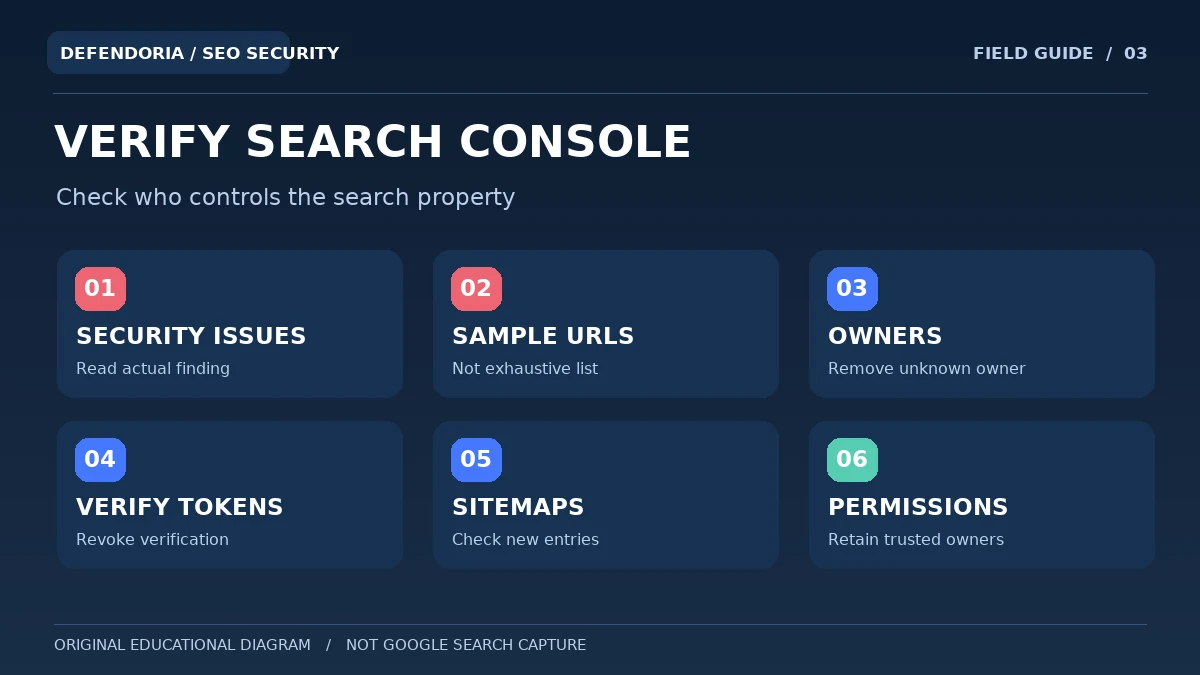
Start with the verified property that covers the affected hostname. Review Security Issues, sample URLs, indexed pages and unexpected query themes. Google advises site owners to inspect users and owners when investigating the Japanese keyword hack because attackers sometimes register additional property owners. Compare every owner with an approved list of employees, consultants and services. If you discover an unapproved verified owner, follow Google’s official removal process and remove the associated verification token.
Removing the owner’s visible account alone may not be enough if a verification file, DNS record, meta tag or other ownership proof remains available. Coordinate with the domain and hosting owners so you do not accidentally revoke your own legitimate verification. If you cannot tell which token belongs to which account, preserve the information and ask an authorized specialist rather than deleting all verification records.
How do you remove Japanese keyword spam safely?
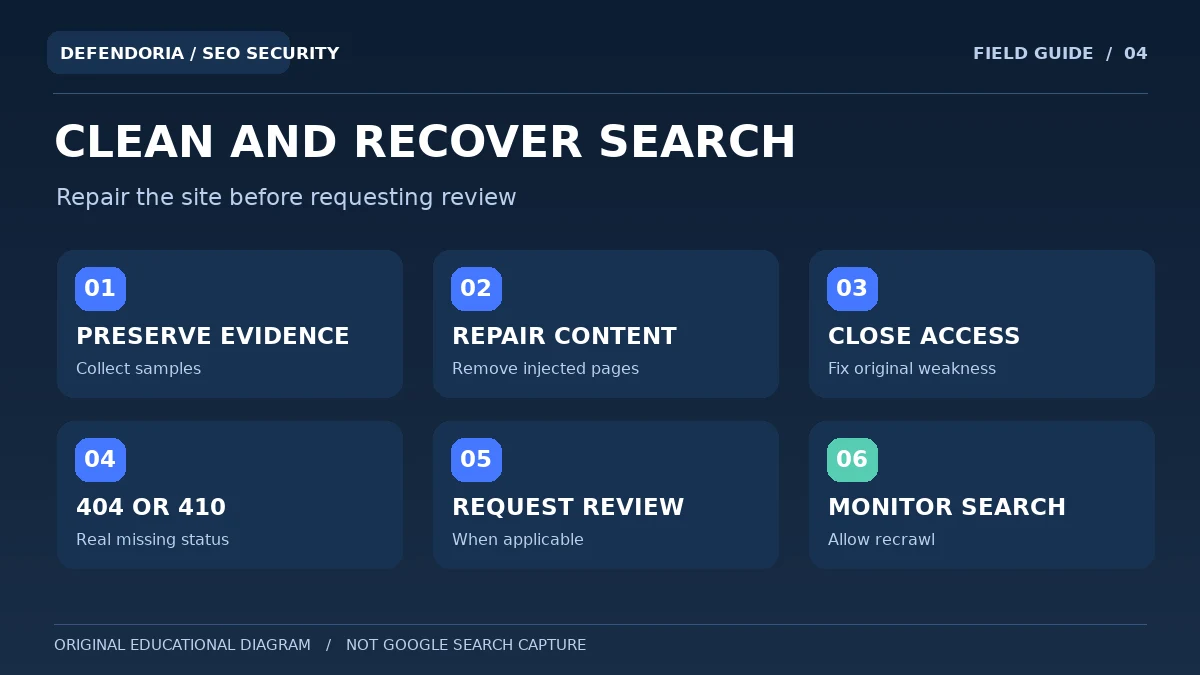
The correct process is to stop ongoing harm, preserve enough evidence, identify the injection and access path, remove unauthorized changes, and verify recovery. Deleting one page may help visitors temporarily but it will not resolve a generator that can create thousands of new pages. Google’s Japanese keyword hack guide recommends backing up files and databases before cleanup and inspecting account and Search Console ownership as part of the response.
1. Document the affected URLs and page behavior
Create a limited sample of the suspicious URLs with exact paths, timestamps and observed titles. Record what Search Console reports and which visitor conditions produce the content. Identify important legitimate language versions so the cleanup team does not accidentally delete approved Japanese pages. A small representative sample can be more useful than a huge unreviewed export.
2. Preserve evidence and backup options
Use authorized hosting or site-management tools to preserve current files, the database and relevant logs in protected storage. Mark incident snapshots as potentially compromised. Review backup dates and integrity; a recent archive can contain the same injected code, while an older restore may lose genuine customer submissions or orders.
3. Locate the unauthorized content generator
Compare trusted WordPress files, extensions, themes, routing and database content with current state. Ask the host about upstream redirects or scripts when appropriate. If the site displays different content to crawlers, inspect reliable server responses and Search Console evidence without exposing an ordinary device to dangerous URLs. Confirm the source before removing any file or database record.
4. Remove malicious modifications and repair access
Replace confirmed altered components with verified vendor versions, remove injected content through a controlled process and close the underlying vulnerability or credential exposure. Review WordPress administrators, hosting access, related sites and connected email. Use a rollback plan so business-critical site functions are not lost.
5. Confirm that obsolete spam URLs stop serving content
For URLs that genuinely no longer exist and have no valid replacement, an appropriate 404 Not Found or 410 Gone response lets search engines understand that the pages are unavailable. Do not return HTTP 200 with a generic “not found” page for every injected URL, and do not redirect all spam addresses to the homepage as a quick fix. A permanent redirect is for content that has an appropriate genuine replacement, not an unrelated spam page.
6. Review Google reports and request the correct follow-up
After the site is repaired, use Search Console’s Security Issues guidance when a security warning exists. Request review after addressing all relevant findings, including the root cause. Monitor indexed URLs, sitemaps and legitimate search appearance over time. Search results may take days or longer to reflect a cleanup because recrawling is not instantaneous.
Why are Japanese spam pages still in Google after cleanup?
Search results can lag behind the current website. Google may continue showing an old title or URL until it recrawls and reprocesses the page. That delay is not proof that malware is still active, but it also should not be used to dismiss reports of continuing malicious responses. Check a small representative set of former spam URLs and their current HTTP status, along with Search Console diagnostics and hosting logs, to distinguish old indexing from live infection.
Some injected URLs are ordinary-looking paths, while others are parameter variations of real pages. The latter can be tricky: an application might continue responding HTTP 200 with its homepage for an unknown query string. Google can then have difficulty recognizing that the malicious URL is gone. Fix behavior carefully, because many legitimate campaigns, searches and tracking systems also use query parameters. An arbitrary blanket rule blocking all parameters could break your website.
| Situation | Appropriate direction | Common mistake |
|---|---|---|
| Hacked page is gone with no replacement | Return an honest 404 or 410 status | Serve an unrelated homepage with HTTP 200 |
| Real business page moved | Use a relevant permanent redirect | Send visitors to an unrelated destination |
| Old spam URL still shown in search | Confirm live response and allow recrawl | Assume index persistence proves new infection |
| Search Console reports security issue | Finish site-wide remediation and request review | Request indexing instead of security review |
| Legitimate Japanese translation exists | Keep approved language content intact | Delete every Japanese-language URL |
The Search Console Removals tool can sometimes hide a URL temporarily, but temporary hiding is not a substitute for fixing site content and ensuring correct long-term responses. Similarly, blocking a URL in robots.txt can prevent recrawling that would otherwise confirm a page is gone. Follow Google’s published indexing guidance based on the actual situation rather than applying all removal mechanisms at once.
What if the Japanese content is actually legitimate?
Not every Japanese search result is an attack. A legitimate site may have Japanese products, translations, customer reviews, localized landing pages, syndicated content or user-generated contributions. A multilingual content-management system may create language folders with unfamiliar patterns. Start by asking who published the pages, whether the content meets the site’s editorial policy and whether the URLs follow known localization rules.
An attack becomes more plausible when pages have no authorized owner, point to unrelated counterfeit shops, proliferate across randomized paths or appear only to crawlers. Preserve evidence of why the page is considered unauthorized. This prevents hasty deletion and helps a security responder distinguish malicious content from an unfamiliar but valid publishing feature.
A business-friendly recovery checklist
- Capture suspicious titles, URLs and screenshots without visiting dangerous destinations unnecessarily.
- Confirm the website’s intended languages and published content inventory.
- Inspect Security Issues and sample URLs in the correct Search Console property.
- Review verified owners and their associated ownership tokens.
- Preserve an evidence snapshot and available server logs.
- Investigate plugins, themes, database-generated routes and host-level configuration.
- Repair confirmed malicious changes and secure accounts and integrations.
- Verify critical forms, payments, navigation and legitimate translations.
- Return accurate 404 or 410 responses for removed URLs without replacements.
- Request security review when applicable and monitor Search Console processing.
- Maintain updates, access controls, backups and change monitoring.
Frequently asked questions about the Japanese keyword hack
Does Japanese text in Google mean my site was hacked?
No. Japanese is a legitimate publishing language, and multilingual sites can rank for Japanese queries. The concern is unauthorized pages, suspicious product offers, random URL patterns and evidence of a compromise. Compare the results with your approved content and Search Console findings before concluding that the site is infected.
Can a WordPress site show clean pages to me but spam to Google?
Yes, some compromised sites use conditional or cloaked content, and Google has documented such patterns. However, caching and ordinary localization can also make responses differ. Preserve the exact affected URL and investigate through authorized technical tools rather than relying on a single browser visit.
Can the hacker become a Google Search Console owner?
Google’s dedicated Japanese keyword hack guide warns that attackers sometimes register themselves as verified property owners. Review owner access and the verification methods used. Remove any confirmed unauthorized owner and its verification token through Google’s official process while retaining legitimate ownership.
Do I need to delete every Japanese page on WordPress?
No. Remove only confirmed unauthorized or harmful content and repair the mechanism that created it. Keep legitimate Japanese translations and business content. Deleting the entire language directory could damage a valid international website.
Why don’t suspicious pages appear in my WordPress Posts list?
A malicious script, rewrite rule, modified theme, server-side component or database-generated route can serve URLs without creating normal WordPress posts. The precise source must be established through evidence. The normal editor list is not a complete map of every possible web response.
Will a WordPress malware scanner find the Japanese keyword hack?
A scanner may detect some injected files or suspicious patterns, but its coverage depends on the tool. It may miss host-level changes, custom code or certain dynamically generated responses. Combine scan findings with Search Console, file integrity, access review and hosting evidence.
Can returning 404 or 410 remove hacked pages from Google?
When a removed URL has no real replacement, an honest 404 or 410 response helps indicate the content is gone. Google still needs to recrawl and process the change, which can take time. Correcting HTTP responses does not by itself remove any hidden malware or unauthorized site access.
Should I block all spam URLs with robots.txt?
Not automatically. Blocking crawling can prevent Google from seeing that a removed page now returns 404 or 410. Robots directives also cannot replace repairing the infected site. Choose URL handling with an authorized technical expert who understands legitimate search and campaign paths.
How long until Japanese spam results disappear from Google?
There is no guaranteed universal time. Google needs to recrawl and update its systems after the pages are removed or fixed. Some URLs can linger in search reporting for weeks or longer. Monitor representative URLs and the correct Search Console reports rather than promising an instant cleanup of the index.
When should I hire a security specialist?
Seek qualified, authorized assistance when large numbers of pages appear without an obvious WordPress source, Search Console ownership is suspicious, malware keeps returning, hosting logs or server configuration are needed, or customer safety is at risk. Ask for documented scope, access handling, cleanup evidence and verification.
Primary references and editorial transparency
The attack description is based on Google’s published Japanese keyword hack guide, Search Console documentation and official WordPress hardening material. The guide’s illustrations are original conceptual diagrams, not screenshots of an actual compromised client website. The article does not claim that Defendoria accessed or diagnosed any specific site.
- Google web.dev: Fixing the Japanese Keyword Hack.
- Google Search Central: #NoHacked — Fixing Common Hack Cases.
- Google Search Console: Security Issues Report.
- Google Search Console: Verify Site Ownership.
- Google Search Central: Spam Policies and Hacked Content.
- Google Search Central: Debugging Web Pages and Recrawling.
- WordPress.org: FAQ My Site Was Hacked.
- WordPress Developer Resources: Hardening WordPress.
This is general educational guidance, not a security assessment of a specific website. Obtain authorization before any technical testing.